Showing posts with label make a font. Show all posts

Monday, 8 August 2011

Facing off with Fonts

This request from an author whose book I was coordinating a few years ago opened my eyes to the psychology of fonts. She wanted to send questionnaires to a bunch of people and, since she was far off in Russia, wanted me to do the sending.

“I find that this is a most readable font and people always reply when I send it in this font,” she explained.
That set me thinking about fonts and the visual persuasion strategy. Just as we respond better to some handwriting, is it true that we respond better to some fonts? Father Google said yes. 

And, just as handwriting can tell us a lot about the writer, can the computer fonts tell us anything about the person using them? 

Oh yes, said Father Google again, throwing an old study The psychology of Fonts, by Dr Aric Sigman, commissioned by Lexmark Printers, at me.

Wednesday, 3 August 2011

Windows Vista, 7 - Install New Fonts And Manage


Windows 7 has a wide range of fonts but they are still not enough for some users. Unfortunately, a command for installing more fonts is not available in the font folder at first glance.


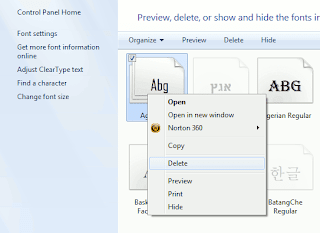
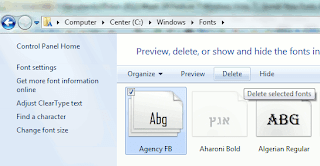
In order to configure fonts, click 'Appearance and Personalization' in the Control Panel and then 'Fonts'. In this view, every entry already has a mini preview of the relevant font.


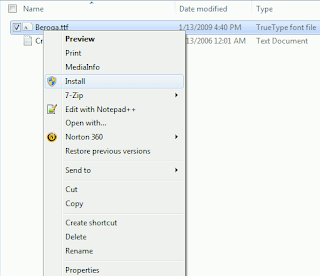
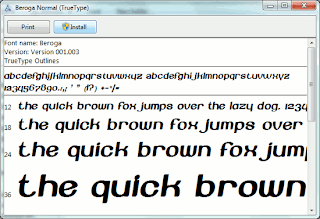
There are several options for installing new font types. It is usually enough to copy the new font file into the folder 'C:\Windows\Fonts'. The disadvantage of this method is that only the file name and not the font name is later displayed in applications. It is thus better to select one of the following procedures: Open the folder with the desired font file in Windows Explorer. Right click the file entry and select the context command 'Install'. Even the preview window of the font type which opens on double clicking has an 'Install' button. A click on it integrates the font into the system.


The other option is to open the Fonts folder and press [Alt]. Windows then displays the menu bar. Click 'New Font' in the 'File' menu, navigate to where the new font is saved and open the file. (Works in Windows Vista)

New Font Monarcha

Monarcha is a serifed type family with a baroque style influence. Its roman versions are slightly skewed and its italics have unusual calligraphic features. The contrast between thick and thin strokes is relatively smaller than in conventional serif fonts. These characteristics, coupled with its rounded shapes, give Monarcha a special fluidity and texture.

The family consists of 8 styles, 4 weights in Book, Regular, SemiBold and Bold, plus related italic versions. These OpenType format fonts have extended character sets to support Western European CE, Baltic and Turkish languages.